Filling in the tax registration questionnaire – which address goes where?
The tax registration questionnaire (Fragebogen zur steuerlichen Erfassung) step by step: one-month deadline, ELSTER registration with e-mail, the exact click path to the form – and which address goes into which field.
After registering your trade or starting as a freelancer, the tax registration questionnaire (Fragebogen zur steuerlichen Erfassung) is next. It gets you your tax number. It asks for several addresses – and this is exactly where many queries from the tax office come from. This guide shows the way to the form and which address goes into which field.
Who has to submit the questionnaire – and by when
Anyone who opens a business or takes up a freelance activity must give the tax office “further information on the legal and factual circumstances relevant for taxation”, and do so “using the officially prescribed data set via the officially designated interface” (§ 138(1b) AO) – i.e. electronically. Only on application can the tax office allow the paper form “to avoid undue hardship”.
The deadline: “within one month of the reportable event” (§ 138(4) AO). ELSTER puts it like this: the questionnaire “must be sent to your responsible tax office within one month of starting your activity, without being asked”. The tax number arrives “by post after the questionnaire has been checked” (ELSTER: starting a business).
Step 1: Register with ELSTER
You need an ELSTER account for the questionnaire. According to ELSTER, founders without a tax number register the business “using your e-mail address under Benutzerkonto erstellen” (create user account). You receive two e-mails: first a confirmation link, then an activation code and an activation ID; these create a certificate file. Important: with this certificate you can “only” send the tax registration questionnaire. Once the tax number has arrived, you convert the registration into a full account (ELSTER: starting a business).
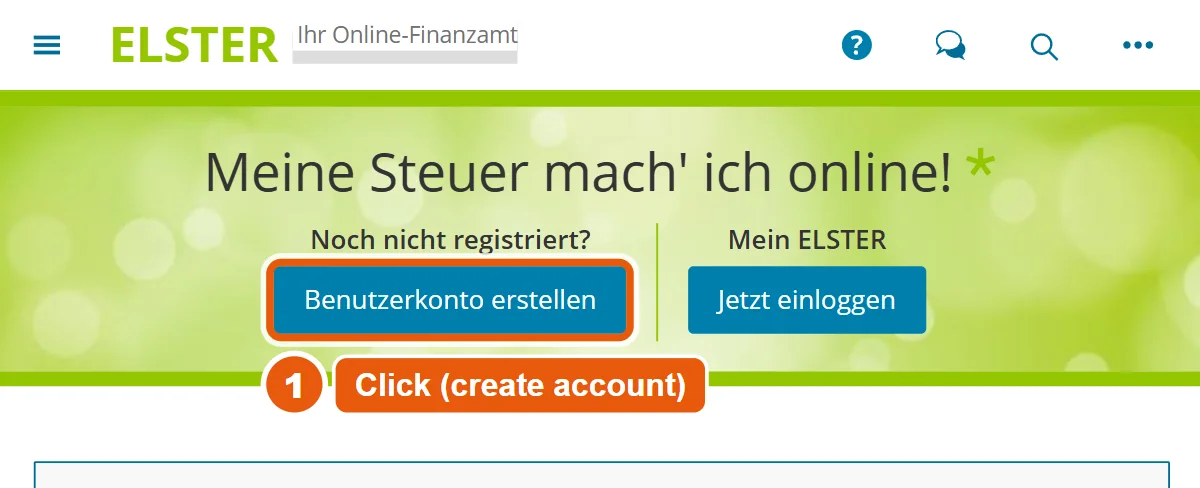
Click path: elster.de → top right “Benutzerkonto erstellen” → choose the account type. On the selection page ELSTER answers the question “I am a sole proprietor or solo self-employed. Which account type should I choose?” itself – read the answer before you click. ELSTER has an English version (“EN” at the top), but the forms are in German.
Step 2: Open the right form
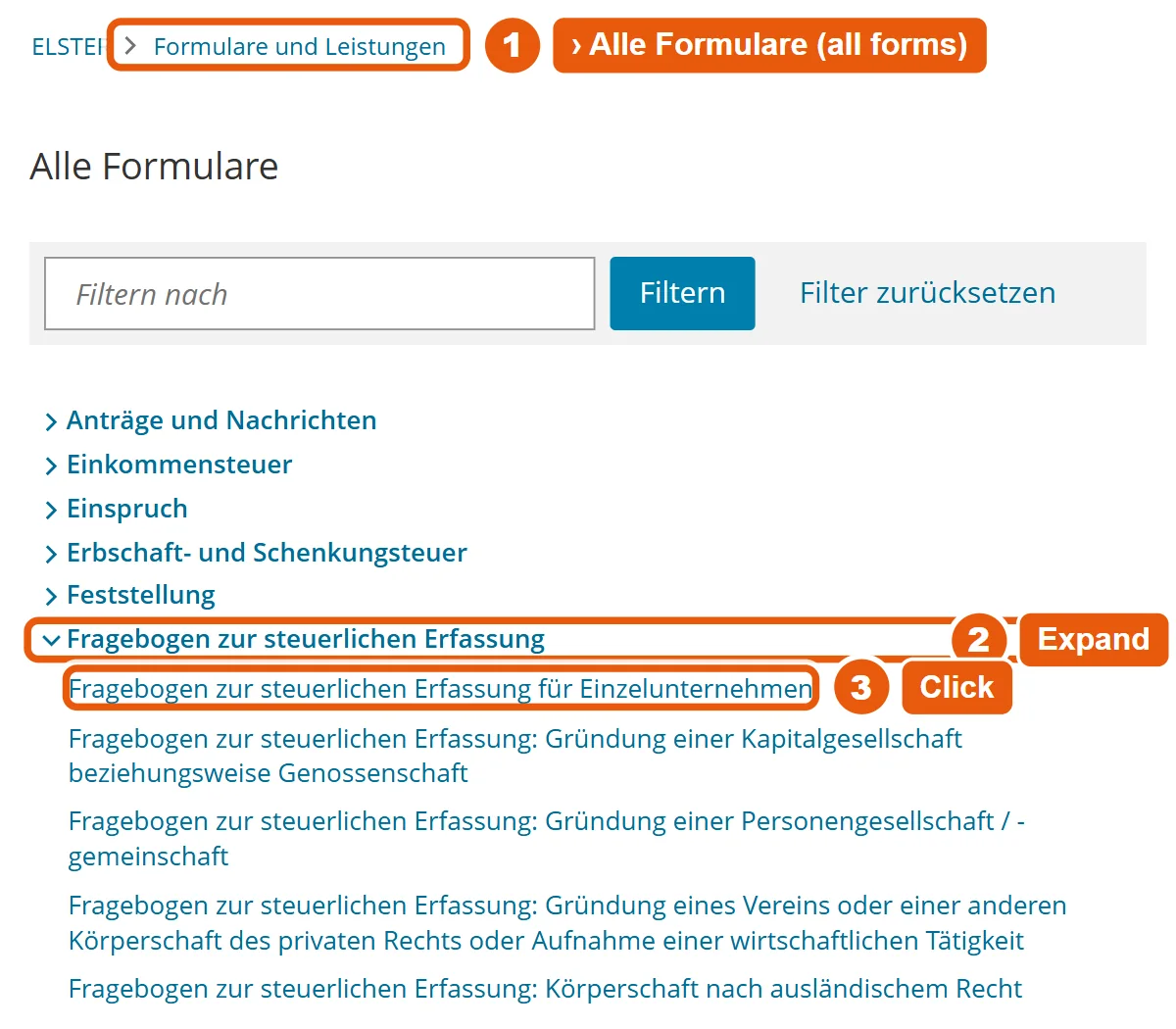
Click path: Formulare und Leistungen → Alle Formulare → expand “Fragebogen zur steuerlichen Erfassung” → choose the matching form. Then log in. You can choose from:
- “Fragebogen zur steuerlichen Erfassung für Einzelunternehmen” – for traders and freelancers starting on their own;
- “… Gründung einer Personengesellschaft / -gemeinschaft” – partnerships such as a GbR;
- “… Gründung einer Kapitalgesellschaft beziehungsweise Genossenschaft” – corporations such as a GmbH or UG;
- as well as forms for associations and for corporations under foreign law.
Step 3: Which address goes where?
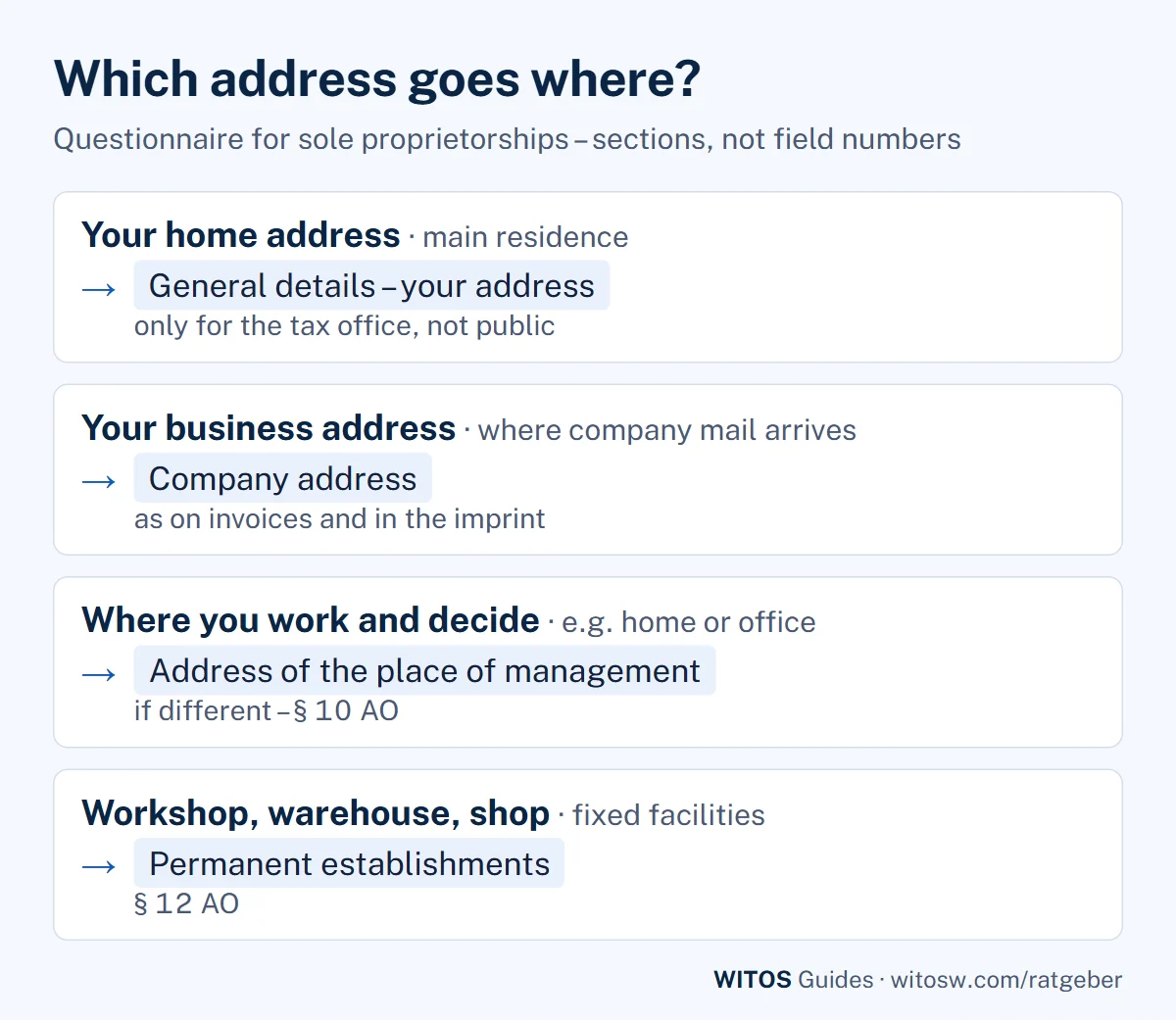
Field numbers change from version to version; the sections stay similar. The explanations follow the filling aid for the questionnaire for sole proprietorships (PDF, German, via the IHK) – an older edition: line numbers and amounts in it (such as the former small business threshold) are out of date.
| Section of the questionnaire | What goes in? |
|---|---|
| General details – your address | Your main residence: “Please enter your main residence.” This is for the tax office, not for the public. |
| Company details – company address | The postal address of the company with your contact details – the address at which your company receives mail, for example a business address. |
| Address of the place of management | Fill in if it differs from the company address. If you use a business address as the company address, enter here the place where you actually work and make decisions. “The place of management is where the business decisions are made” (§ 10 AO: “centre of the commercial top management”). |
| Permanent establishments | Other fixed places of business such as a workshop, warehouse or shop, with their address (§ 12 AO). |
| Tax adviser / authorised recipient | Only if another person – such as your tax adviser – is to receive letters and assessments for you. This requires a separate power of attorney to receive. |
Home address, business address, place of management – the difference
- Home address: For sole proprietors, income tax is as a rule handled by the tax office of the district where you live (§ 19 AO); in Berlin, if your business is in another district, the tax office of that district may be responsible (§ 19(3) AO). That is why your home address always goes into the questionnaire – even if you use a business address.
- Business address: the address at which your company receives mail and presents itself (invoices, imprint). It goes into the field “company address”.
- Place of management: the place where decisions are made. A pure postal address is not automatically that. For VAT, the responsible tax office is the one “from whose district the entrepreneur operates his business … wholly or mainly” (§ 21 AO); for a GmbH, responsibility follows the place of management (§ 20 AO).
In Berlin, the 17 regional tax offices in the districts are responsible for sole proprietorships, and four corporate tax offices for corporations such as a GmbH (Berlin Senate Department for Finance).
Step 4: Other important details
- Small business scheme: In the VAT section you state whether you use the small business scheme under § 19 UStG. Thresholds, pros and cons are explained in Small business scheme 2026.
- Expected income: In the section on advance payments you state, according to the filling aid, “all expected income for the year the business opens and the following year”. Estimate realistically.
- Bank details: for tax refunds; if you wish, also for the SEPA direct debit.
What to enter in your case, especially for the income estimate, is best discussed with a tax adviser if in doubt.
Common mistakes
- Business address instead of home address in the personal details – your main residence belongs there.
- Entering a pure postal address as the place of management, although you make decisions elsewhere.
- An address where mail does not arrive – the tax number comes by post.
- Missing the deadline – one month after starting.
- Forgetting a power of attorney to receive if assessments are to go to your tax adviser.
Not registered with the Ordnungsamt yet? Read Registering a business in Berlin – step by step first.
General information, not legal advice for your individual case. The linked official sources and the competent authority are authoritative.
Need a business address in Berlin for this? How the WITOS business address works →